
Behnke Station doesn't obtain an IP address via DHCP
Ex works, the Behnke Station will always try to obtain an IP address from a DHCP server. If it is not able to obtain an IP address in this way, it will assign an IP address itself after a certain period of time (Link-Local/APIPA). If your device does not receive an address from your DHCP server and you do not see the MAC address of the Behnke Station in the server, for example, please proceed as follows.
1. Determining the IP address
When the Behnke Station is powered up and booted successfully, you can use the configuration button on the electronics to output the current IP address of the call station by means of a voice announcement. Whether the call station is ready for operation can be seen from the fact that the status LED flashes red every second. If this is the case, press the configuration key to start the voice menu. Simply follow the announcements to have the IP address of the device output.


If the device is in the delivery state, there are two possibilities. Either the device has received an address from your DHCP server, or it has assigned itself an address in the link-local network (or APIPA). When announcing the IP address, the call station gives a hint where its IP address comes from ("The dynamic IP address is: ... ", or "The self-assigned IP address is: ... ").
If the device has received an IP address from your DHCP server, you should be able to access it with the address. If this is not the case, please check whether it is possibly due to firewall rules, routing or the configuration of your computer.
If the Behnke Station has assigned itself an address despite an existing and accessible DHCP server, please proceed as described in the following step.
2. Deactivating fallback to link-local
If the Behnke Station has assigned itself an IP address from the Link-Local/APIPA range despite the presence of a DHCP server, it may simply have taken too long to receive a response to the DHCP request. In this case you can simply disable the fallback to Link-Local:
-
Please assign your computer a link-local address as well, otherwise you will not be able to access the Behnke Station's web interface. The address of the computer must be in the range 169.254.0.0/16, for example
169.254.123.123, with using the netmask255.255.0.0.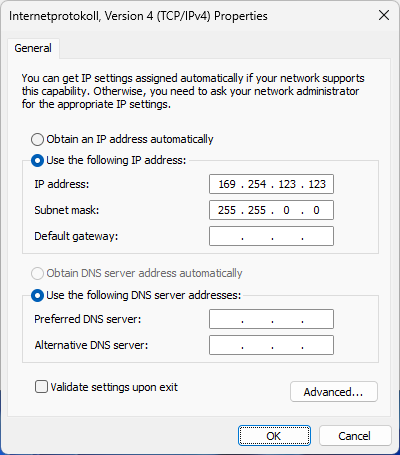
-
Then access the Behnke Station's web interface via browser using the IP address and log in. Then go to "Network" in the menu on the left. Then scroll down to the “Device” area. There, select the option "no" for "Allow fallback to link-local" and click Save.
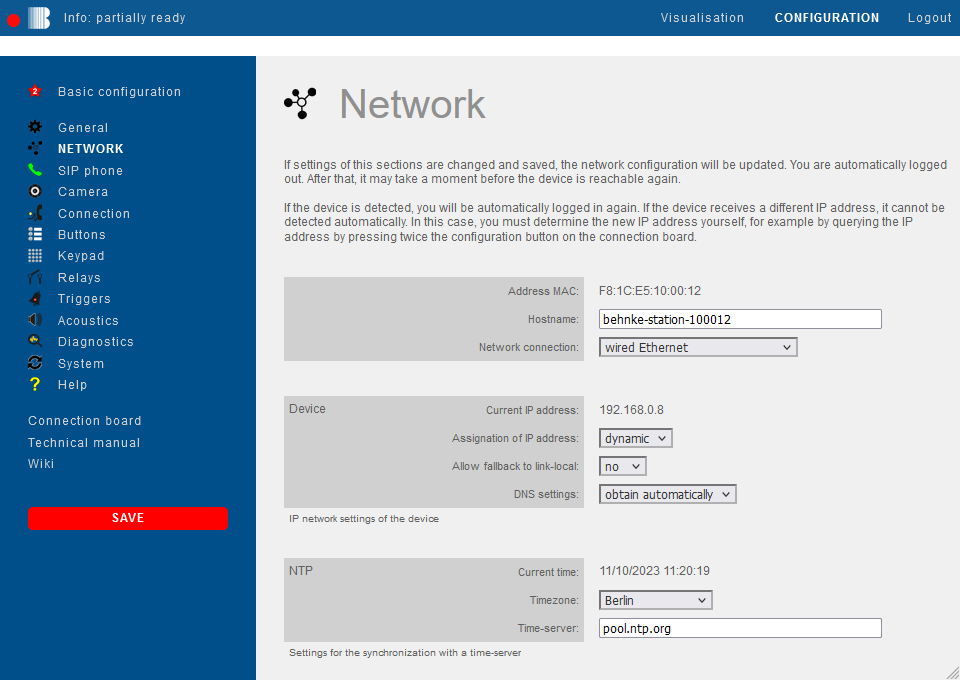


The device will then reboot and try to obtain an address via DHCP again. A link-local address will no longer be assigned, even if the address assignment via DHCP takes a long time.
ATTENTION: In networks without a DHCP server, the fallback should not be deactivated because otherwise the call station will not start with an IP address and the configuration interface will therefore not be accessible.
If it is not possible to access the Behnke Station's web interface, please contact our support:
3. DHCP
The address assignment via DHCP should now have been completed successfully. After the device has restarted, you can query the device's address again as described in step 1. If the address assignment still doesn't work, the DHCP server is probably not accessible from the device. If you can rule out a problem in the local network, please contact our support.